How to Fix Extension Library Download Failure
What should I do if I can't download the extension library? How do I install the extension library offline?
Problem Description
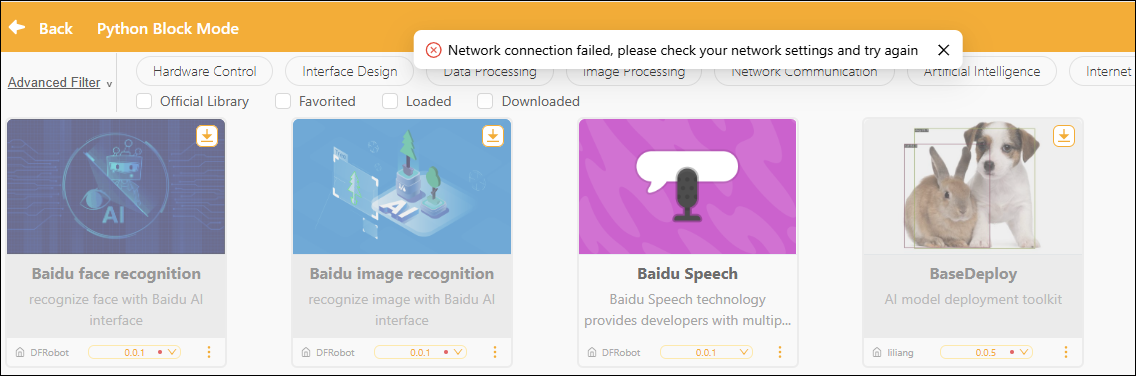
- When adding an extension library, the system displays the message "Network connection failed. Please check your network settings and try again," preventing the extension library from downloading and installing properly.
- Extension libraries cannot be downloaded properly in server rooms or in environments without internet access.
Analysis of Causes
- Mind+ 2.x adopts a distribution model that separates the software from the extension libraries to reduce the size of software update packages; extension libraries can be updated independently and added as needed.
- The extension library requires an internet connection to retrieve the list of extension packages and resources when used for the first time; the initial download cannot be completed in an offline environment.
- Some extension libraries also require access to third-party dependency sources during installation or runtime, which may result in loading failures when network access is restricted.
Solution
1. Check the network status
- Check whether your computer is connected to the Internet.
- Try opening your browser and visiting another website to verify your internet connection.
- WiFi Make sure you have a stable internet connection and avoid using unreliable Wi-Fi.
2. Check Domain Access Permissions
Some school or corporate networks may restrict access to the following domains, preventing the extension library from being downloaded:
Mind+ Official Domain:
*.mindplus.top
*.mindplus.cc
*.dfrobot.com.cn
Third-party Python library sources:
pypi.org
pypi.tuna.tsinghua.edu.cn
mirrors.aliyun.com
If this occurs, please contact your school or company’s network administrator to request that access to these domains be enabled.
3. Deploying Using an Offline Resource Package
- For environments without internet access or server rooms, we provide an offline installer and an extension library resource package (updated periodically).
- Download links for the offline installer and extension library resources: Click to download.
- After downloading, please review the PDF tutorial included in the compressed file (e.g., “Mind+V2.X Extension Library Offline Installation Guide.pdf”) before proceeding.
Important Reminder: Please ensure that your extension library resource packages and Mind+ version are up to date;