3.1.3.6 Sensing
Sensing blocks are used to detect the state or external conditions during program execution, such as determining whether a button is pressed, whether an object is touched, sound volume, or coordinate changes, providing data support for logical judgment and response.
| col1 | col2 |
|---|---|
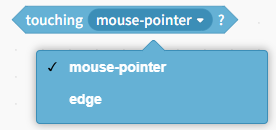 | This condition applies when the character touches the "mouse pointer" or "stage edge" position; otherwise, it does not. |
 | This condition is met when the character encounters a color (color can be chosen at will); otherwise, it does not. |
 | This condition applies when a character's color encounters another color; otherwise, it does not. |
 | Return the distance between the character and the mouse pointer, and note that the mouse needs to be on stage. |
 | The stage displays the input box and waits, used by the keyboard to allow users to input information through the keyboard. |
 | Returns the result of the previous input; check the box to display it on the stage. |
 | This condition is true when a key on the computer keyboard is pressed; otherwise, it is false. |
 | This condition is true when the mouse button is pressed; otherwise, it is false. |
 | Get the x-coordinate of the mouse's position on the stage. |
 | Get the y-coordinate of the mouse's position on the stage. |
 | Set the character's drag mode to "Dragable" or "Not Dragable." |
 | Get the volume level of your computer's microphone; check the box to display it on stage. |
 | The timer will automatically increase from 0 as time passes; check the box to display it on the stage. |
 | Reset the timer. |
 | Retrieve the stage's "background ID," "background name," and the volume set in "Sound." |
 | Retrieve the "year," "month," "day," "day of the week," "hour," "minute," and "second" of the current time. |
 | Get the number of days from 2000 to the present. |